
A long article is not automatically a linkable asset. Neither is a calculator simply because it has an interactive interface. A resource earns consideration when it helps someone explain, verify or complete a task.
Linkable assets are resources that give other publishers a practical reason to reference your website. They can include original data, templates, tools, visual explanations and dependable reference material.
For a small team, the best starting point is often a narrow problem you understand well. You need enough expertise to create something useful and enough capacity to keep it working after the launch.
This guide focuses on selecting and building the resource itself. Before you assemble a prospect list, establish what your asset contributes and why someone would recommend it.
Define the person who will use the asset
“Our audience is businesses” is too broad to guide a useful resource. Identify a specific person facing a specific task.
Imagine a fictional e-commerce packaging supplier. Its customers include small stores preparing fragile products for shipping. A store owner may need to compare packaging options, while a warehouse supervisor needs a repeatable packing procedure.
Those users need different assets. A comparison worksheet could help the owner; a printable packing inspection checklist could help the supervisor.
Write the user and task in one sentence: “A small-store owner needs to estimate packaging requirements for a new product before ordering supplies.”
Now decide what successful use looks like. The owner should leave with a reasonable estimate and an understanding of its assumptions. That is more concrete than wanting visitors to read a comprehensive guide.
Distinguish the user from the recommender
The person using the resource may not be the person linking to it. A training provider, trade publication or consultant might recommend your packaging worksheet to store owners.
List a few plausible recommenders and ask why each would include the asset. A shipping tutorial may need a worked example. An enterprise support organization may need a free planning worksheet.
This exercise tests the distribution logic before development. If you cannot identify a setting where another publisher would use the resource, the link-building case is weak even if customers might appreciate it.
You can still create the asset for customer support or sales enablement. Be clear about its primary job rather than assuming every useful business resource will attract backlinks.
A strong candidate serves its user and offers a clear contribution to a publisher's existing work.
Choose a format that matches the task
Start with the output the user needs, then choose the format. Do not begin with an expensive interactive tool if a well-designed worksheet solves the problem.
Repeat a process: Possible asset: Checklist; What makes it useful: Clear steps and completion criteria
Estimate a quantity: Possible asset: Calculator or worksheet; What makes it useful: Visible assumptions and worked example
Understand a pattern: Possible asset: Original dataset; What makes it useful: Documented collection method and limits
Compare alternatives: Possible asset: Decision matrix; What makes it useful: Consistent criteria and transparent scope
Explain a complicated system: Possible asset: Diagram or reference; What makes it useful: Accurate structure and accessible explanation
Formats can overlap. The packaging worksheet might include a short written guide and an example calculation. The question is whether each component helps the task.
Avoid adding features solely to make the asset look substantial. A tool requiring unnecessary inputs may be harder to recommend than a simple table.
Find an original contribution you can support
Originality does not require discovering a new scientific principle. It can come from a clearer method, a neglected audience, a useful format or evidence your business can legitimately publish.
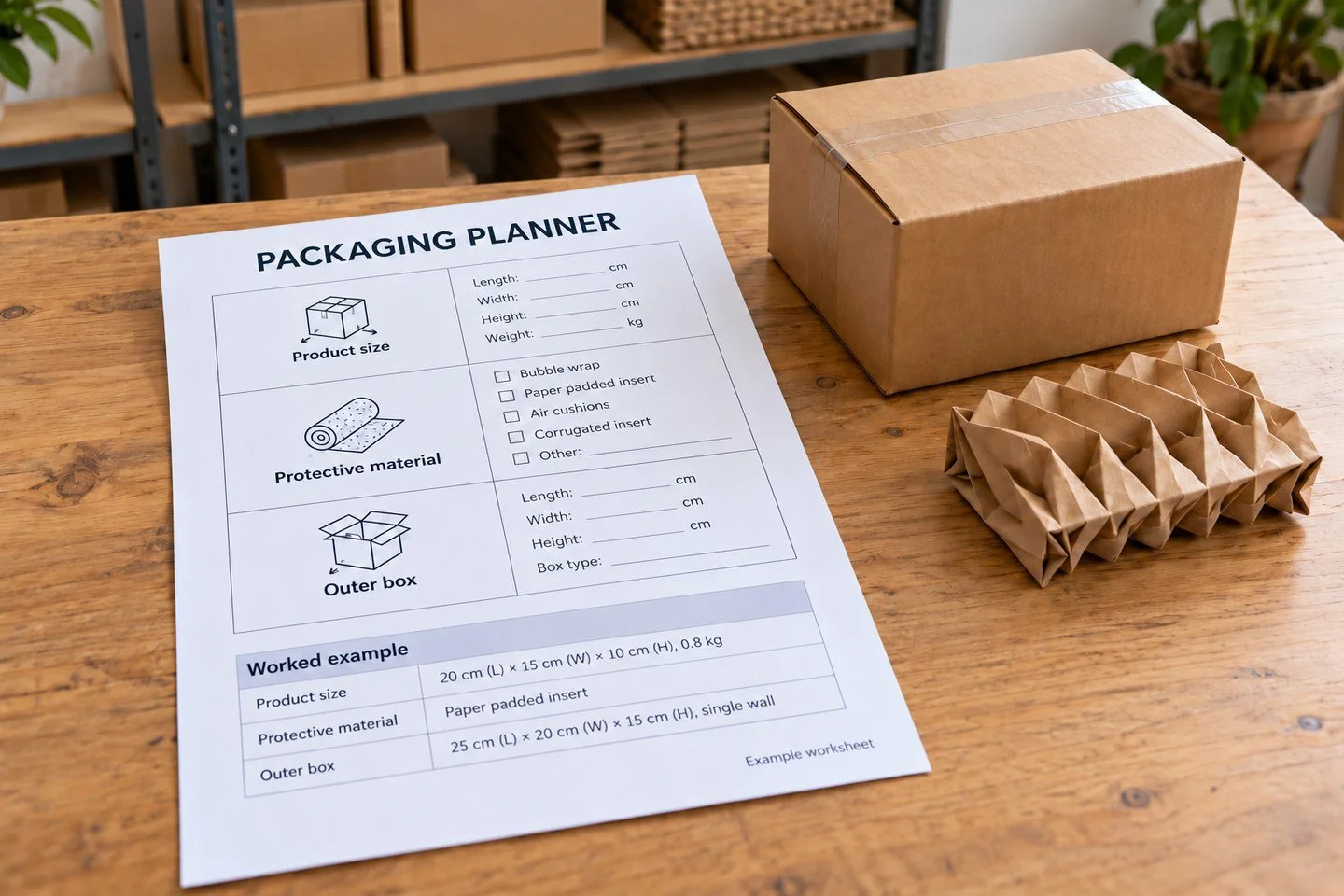
For the packaging supplier, an original contribution might be a worksheet that separates product dimensions, protective material and outer packaging instead of offering one unexplained estimate.
Test whether the distinction matters to users. A resource is not meaningfully different merely because the headings or colors changed.
If you publish data, explain the sample and collection process. Do not turn internal order records into claims about every online store. If the data cannot be shared safely or permission is unclear, choose another format.
If the asset summarizes external research, cite the original sources and identify your contribution as interpretation or organization. Do not imply that the underlying findings are yours.
Write a one-page build brief
Before production, answer the questions that would otherwise cause revisions later.
Audience and task: Who uses the asset, and what decision should it support?
Contribution: What does it provide that a publisher cannot easily get from a generic article?
Inputs and outputs: What information does the user provide, and what do they receive?
Evidence and limitations: Which sources, assumptions and exclusions need to be visible?
Access: Is the resource free, ungated, downloadable or available only in a particular format?
Ownership: Who checks accuracy, approves publication and maintains the resource?
Distribution hypothesis: Which types of publishers might recommend it, and in what context?
This brief is useful even when one person does all the work. It exposes unclear assumptions before they become design decisions or outreach claims.
Build the smallest version that fulfills the promise
For the packaging example, a first version could contain a plain worksheet, one filled example and a short explanation of what the estimate excludes.
It does not need an account system, a complex dashboard or a large library of scenarios. It does need to work reliably for the defined use case.
Keep important instructions beside the inputs. Explain units, rounding and any simplified assumptions. A result without context can create false confidence.
If users need a specialist assessment for unusual cases, make that boundary clear. The asset should not claim universal suitability when it covers only standard conditions.
Publish the resource at a stable URL with an informative title. Let a visitor understand the value before asking for contact details. If registration is required, state that accurately in outreach rather than calling it an open resource.
Test with realistic cases
Ask someone unfamiliar with the build to complete the intended task. Watch where they hesitate and which instructions they misinterpret.
For a calculator or worksheet, test ordinary values, boundary values and missing inputs. Check units and formulas independently from the person who wrote them where practical.
For a checklist, ask whether the steps are actionable and whether the user knows when each step is complete. Vague instructions such as “ensure quality” need a more observable criterion.
For a reference or diagram, check factual accuracy and readability at common screen sizes. Essential information should not exist only in an image without a useful text explanation.
Record the limitations discovered during testing. Fix the important ones before promotion and retain genuine boundaries instead of concealing them in a distant footnote.
Give publishers enough context to assess it
An editor should be able to identify the author, purpose and method without arranging a call. Include a concise introduction and clear ownership.
For a dataset, show the collection period, sample definition and exclusions. For a tool, explain its calculations or decision rules at an appropriate level. For a template, include a filled example.
Provide a stable way to reference the material. If downloads change, keep the explanatory page current so old recommendations still lead to a useful destination.
Do not surround the asset with exaggerated claims about guaranteed results. A restrained explanation of what it does is easier for a publisher to trust and describe accurately.
The goal is not to make the page sound academic. It is to remove unnecessary uncertainty about the resource's usefulness and limits.
Plan promotion around the contribution
Once the asset works, return to the recommender list. Identify the exact settings where it would support the publisher's audience.
The packaging worksheet might fit a guide to launching a fragile-product store or a resource collection for small manufacturers. It may not belong in an article about international tax rules merely because both concern e-commerce.
Use the contribution in the pitch: “The worksheet shows a filled example and separates the assumptions” is more informative than “we created the ultimate packaging guide.”
Keep publisher assessment separate from asset development. Leo's existing article explains how to evaluate a website for backlink opportunities. A good asset still needs a suitable editorial setting.
Do not launch mass outreach before testing a few well-matched conversations. Feedback can reveal that the resource needs a clearer format or more specific audience.
Budget for maintenance after the launch
A useful resource can become unreliable when its assumptions, source data or supporting software change. Assign an owner and a review trigger before publication.
A checklist might need review when the underlying process changes. A dataset needs an accurate collection date. A calculator may need updates when input definitions or costs change.
Do not change an “updated” date without doing the review. Keep a short change note when a substantial revision affects the interpretation of results.
Maintain the URL or provide an appropriate equivalent when moving the asset. A publisher linking to a useful worksheet should not suddenly send readers to an unrelated product page.
If you can no longer support the resource, make a deliberate retirement decision. Consider existing users and referring pages before removing it.
Evaluate usefulness as well as backlinks
Track relevant recommendations and referral activity, but also look for evidence that people can use the resource. Support questions, completion feedback and requests for a particular format can guide improvements.
Keep engagement metrics tied to the asset's job. Time on page means little if users cannot download the worksheet or understand the result.
Some assets attract few links yet reduce repetitive support work. Others earn citations but do little for the intended customer audience. Both outcomes should inform the next build decision.
Avoid declaring the format a failure after one outreach batch. Review the resource, audience and distribution hypothesis separately.
For help connecting a useful asset with suitable publications, explore Leo Corado's link-building focus and publisher outreach services. When you discuss a resource campaign, bring the asset's user, task and contribution so the outreach plan has something specific to work with.