
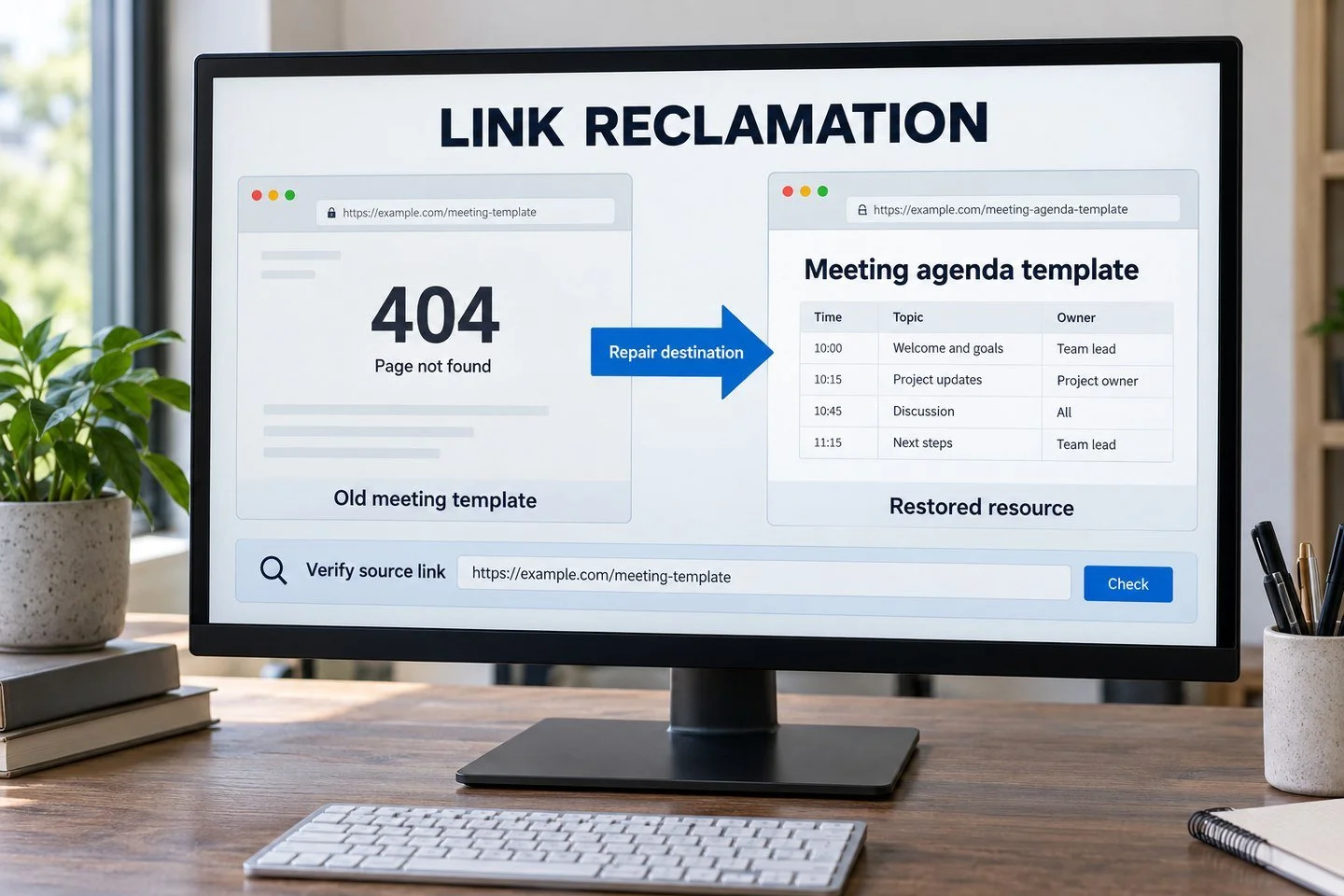
A backlink tool reports that an important link has disappeared. Before emailing the publisher, open the source page. The link may still be there. Your old destination may be broken, or the tool may have temporarily failed to crawl the article.
Link reclamation is the process of restoring previously earned links or recovering their useful paths to your website. The right action depends on what changed.
Some problems are yours to fix, such as an accidentally deleted resource. Others require a polite publisher request. Some cannot reasonably be recovered at all.
This guide gives you a diagnosis-first process so you spend less time sending unnecessary emails and more time restoring recommendations that still make sense.
Keep reclamation separate from new link acquisition
In reclamation, a link to your website previously existed, or an existing backlink now reaches an unsuitable or broken destination on your site.
An unlinked brand mention is different: the publication may have named you without ever linking. Replacing a dead resource that belonged to another organization is also different. Both can produce new links, but neither is the same as restoring your own previous recommendation.
This distinction affects reporting. A recovered link should not automatically be counted as a newly acquired referring domain. If the publisher linked to you before, say so.
It also affects outreach. A restoration request can reference a previous resource or destination, provided your records support that claim. Do not tell an editor that a link was removed unless you have evidence it existed.
Gather evidence from more than one record
Start with lost-link reports from your backlink provider, past placement logs and important URLs affected by a migration or content cleanup.
Record the source page, previous destination, anchor text if known, last confirmed date and the tool's reported loss reason. Keep the report date separate from the actual date the publisher changed the page; they may differ.
Historical screenshots or campaign records can help establish what existed, but inspect the live page before acting. A monitoring system reports observations, not the publisher's intent.
Ahrefs' link reclamation guide describes finding lost-link candidates through backlink reports. Use such reports as an investigation queue rather than a ready-made list of publishers to contact.
Deduplicate repeated links from the same source. A site-wide element disappearing can create many reported losses while representing one underlying change.
Verify what a reader experiences now
Open the referring page and locate the relevant section. Does the article load? Is the link present? Where does it go?
Then open the destination directly. Note whether it returns the expected content, an error, a redirect or an unrelated page. A status code is useful evidence, but the rendered experience matters too.
A page can return a successful response while displaying a generic error message. A redirect can technically work while taking readers somewhere that no longer fulfills the original recommendation.
Also consider temporary access problems. A rate limit, server outage or bot restriction may affect your tool differently from a normal visitor. Recheck a temporary failure before drawing conclusions.
Record what you verified and when. If access prevents a clear diagnosis, label the case unresolved rather than announcing that the link is permanently lost.
Use a diagnosis table to choose the next action
Observed situationLikely actionLink is present and destination worksMark tool discrepancy; no restoration emailSource link points to an accidentally deleted page you controlRestore the resource or assess a relevant permanent replacementOld destination redirects through unnecessary stepsReview and simplify your redirect pathPublisher removed the link but kept the relevant referenceAssess whether a restoration request still helps readersPublisher removed the entire relevant sectionCheck whether your contribution still fits before contactingSource article is goneInvestigate a successor article; do not assume restoration is possibleLink points to an unrelated page after your migrationCorrect the destination mapping before outreach
These are operating decisions, not guarantees of recovered ranking value. The purpose is to identify who can fix the problem and whether the recommendation remains useful.
Repair destinations you control first
Suppose a fictional workplace software company retired its meeting-agenda template during a website redesign. Several publications still link to the old template URL.
If the resource was removed accidentally and remains useful, restoring it may be the most direct solution. If it was deliberately replaced by an equivalent maintained template, a suitable permanent redirect may preserve the reader's path.
Do not redirect every missing resource to the homepage. Someone clicking “download the meeting agenda” expects that resource or a clear equivalent, not a generic product pitch.
Review the old page's purpose, the new destination and any restrictions before choosing a fix. Some resources should stay unavailable, particularly if their content is incorrect or no longer appropriate.
Google's redirect documentation explains permanent and temporary options. Choose the response that reflects the actual change and test the complete path afterward.
Prioritize useful recoveries
A long lost-link report can contain scraped pages, irrelevant sources and recommendations that are no longer current. You do not need to restore every item.
Start with links that served a clear reader purpose and point to destinations you still support. Consider audience relevance, source quality, referral usefulness and the effort required to resolve the problem.
Group technical issues by destination. If twenty source pages point to one accidentally removed asset, repairing that asset can address the common cause before you contact twenty publishers.
Group publisher issues by organization as well. A template change across several articles may require one clear conversation with the responsible editor.
Use Leo's website evaluation approach when reassessing questionable sources. A backlink worth pursuing years ago may no longer be worth reclaiming if the publication or context has changed.
Make a restoration request only when the fit remains
Read the updated article before asking an editor to restore a link. The old recommendation may have become obsolete, redundant or inconsistent with the revised story.
If the reference remains and your destination still supports it, explain the specific issue. Give the source URL, relevant section and current destination.
An illustrative message for the meeting-template example could read:
Subject: Updated destination for your meeting-agenda resource
Hi Elena,
Your team-meeting guide references our agenda template in the preparation section. The original URL stopped working during our site update; we have now restored the template at [current URL].
If you are still maintaining the guide, would you consider updating the resource link? The page includes the editable template and the same instructions your article describes.
Thanks, Jamie
Use that explanation only if it is accurate. Do not blame a migration for an editorial removal or claim the same resource is available when the replacement differs substantially.
Respect editorial changes you cannot reverse
Publishers remove links for many reasons. They may shorten an article, choose a newer source or change their linking policy. Your previous inclusion does not create a right to permanent placement.
If the editor explains that the resource is no longer relevant, record the reason and close the request. If the article now serves a different task, find a better future contribution rather than insisting on restoration.
A deleted source page may have a successor, but do not assume the old link belongs in it. Read the successor and evaluate it as a fresh editorial setting.
Avoid pressuring a publication with claims about damage to your rankings. Explain how the correct destination helps its readers instead.
Keep sponsorship or advertising negotiations separate from restoration of an independent recommendation. A new commercial offer should be reviewed and reported on its actual terms.
Verify the repair from end to end
After a technical fix, test the old linked URL and follow the path to the final content. Confirm that the destination is relevant, accessible and free from loops or avoidable detours.
After a publisher update, open the source page and click the live link. Record the anchor, target, context and any link qualification. A reply saying “done” is not enough for a verified placement record.
Separate the result categories: resource restored, redirect corrected, publisher link restored, publisher destination updated or unresolved. These categories show what your team actually accomplished.
Do not wait for a backlink tool to rediscover the change before checking it yourself. Crawling delays can make a repaired link appear lost in a report for some time.
If your manual check and tool disagree, retain both observations with their dates until the difference is resolved.
Prevent repeat losses during content changes
Before retiring important resources, review known backlinks and user needs. Map old URLs to suitable successors where appropriate and retain a record of the decision.
Include outreach destinations in migration planning. Content and technical teams should know which tools, studies and templates outside publishers currently recommend.
Maintain a small register of valuable assets with an owner, current URL and review date. A working download or accurate dataset may deserve more maintenance attention than another new blog post.
Schedule checks according to importance and change frequency. Critical campaign destinations may need review after every major release; stable references can follow a lighter schedule.
The goal is to preserve useful paths for readers. Rankings are one reason to care, but a person arriving from a trusted recommendation should also find what they expected.
For help reviewing lost-link candidates or maintaining campaign records, explore Leo Corado's link-building work and service scope. When you request a campaign discussion, bring the source URL, old destination and any evidence of what changed.